![Logo-myhotel-blanco.png]](https://soporte.myhotel.cl/hs-fs/hubfs/Logo-myhotel-blanco.png?height=40&name=Logo-myhotel-blanco.png)
In order to properly manage users with access to the platform, you must know the types of users available.
A user is a person who has access to the platform by creating a login associated with his or her e-mail address.
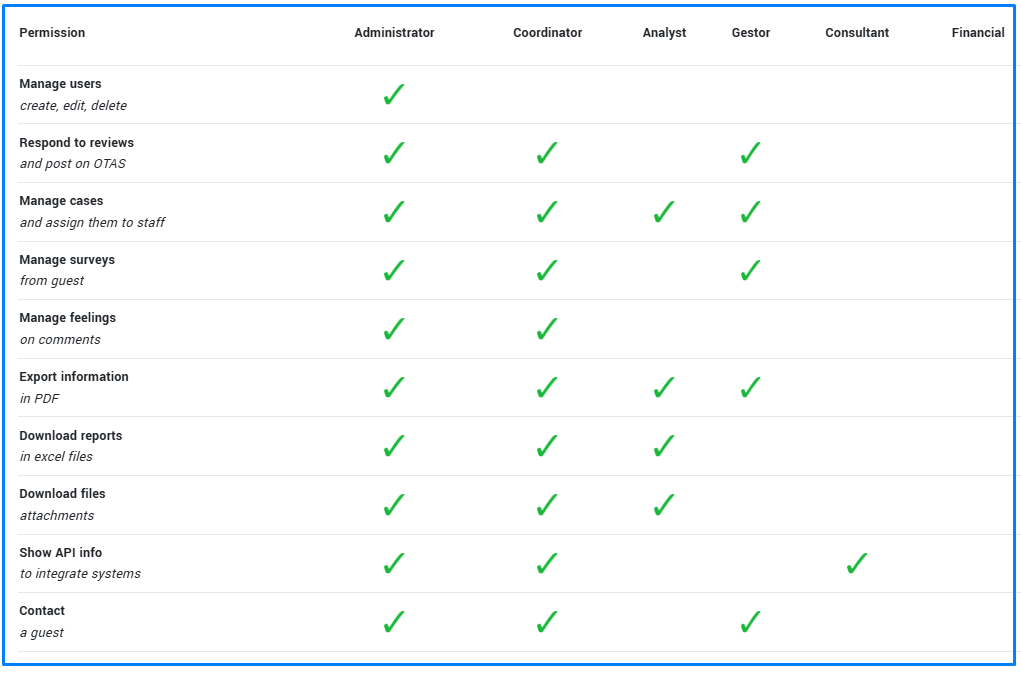
When creating a new user or even when a user is already created, the administrator can assign a specific user type, which will give more or less permissions to perform certain actions in Fidelity.
The types of users are the following:
- Administrator: Has permissions to perform any action available on the platform, including the management of other users and all cases in Desk.
- Coordinator: Has permissions to perform any action available on the platform, except managing users and all cases in Desk.
- Analyst: This user can manage own cases in Desk (assigned or created), export surveys to pdf, download reports, download attachments from Web Check In.
- Manager: This user can respond to Online reviews, manage own cases in Desk (assigned or created), manage guest surveys, export surveys to pdf and contact guests.
- Consultant: Can only consult information through the API.
- Financial: Can only access the Billing section.