
💡 Golden Rule: We recommend keeping your surveys short and concise. A direct, brief survey significantly increases the completion rate and ensures your guests do not drop out halfway through.

1. The NPS (Net Promoter Score) Question
Global Industry Standard
Measuring the Net Promoter Score (NPS) is the international standard metric for gauging guest loyalty in the hotel industry. For this reason, it is always included in the survey.
-
Position: Can be placed in any position, though it is usually question #1 of the survey.
-
Scale: Numerical from 0 to 10 (where 0 represents "Unlikely" and 10 "Very likely").
-
Format: The scale and its methodological wording are fixed to ensure results are comparable against industry benchmarks.


2. Available Question Types
To adapt the survey to your specific needs, you can select from the following question types when structuring it:
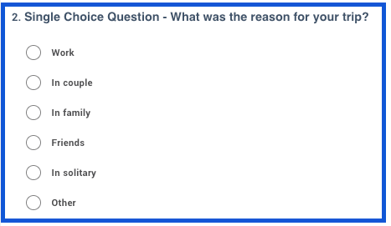
Option 1: Single Choice
The guest can only choose one option from the list.
-
Ideal for: Purpose of travel, booking channel, age group, stay type.
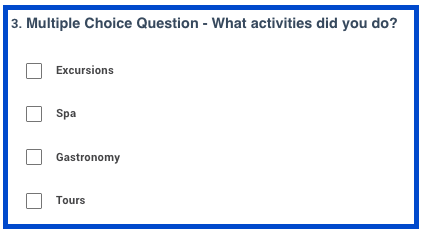
Option 2: Multiple Choice
The guest can select one or more options based on their experience.
-
Ideal for: Amenities/services used during the stay, referral source (how they heard about the hotel), areas visited.
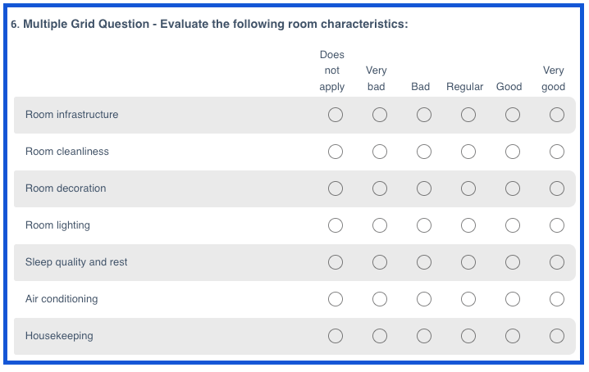
Option 3: Grid
Allows guests to rate different aspects of the hotel in an organized, uniform format. It can range from a single item (Simple Grid) to multiple evaluation areas (Multiple Grid).
Standard Rating Scale: 0 to 5
| SCORE | STANDARD OPTION | DESCRIPTION |
| 0 | Doesn't apply |
The guest did not use the service |
| 1 | Very bad |
Unsatisfactory / Critical experience |
| 2 | Bad |
Below expectations |
| 3 | Regular |
Acceptable / Neutral |
| 4 | Good |
Satisfactory / Meets expectations |
| 5 | Very good |
Excellent / Exceeds expectations |

Option 4: Comment Question (Long Open Text)
Allows the guest to write suggestions, compliments, or detailed feedback in free-form text.

Option 5: Text Question (Short Open Text)
Allows the guest to write a short response, such as name, phone number, staff member name, etc.


3. Conditional Question Structure (Skip Logic)
Conditional questions allow additional questions to be displayed based on the guest's response (for example, asking about restaurant details only to those who indicate they used it).
✅ Design Rule – 1 Conditional Level Allowed: A main question can trigger one or more follow-up questions associated with the guest's choice.
🚫 Avoid – Sub-conditionals (Conditionals within another conditional): To ensure smooth mobile navigation and prevent the survey from becoming overly complex or confusing, second-level branching (sub-questions within another sub-question) is not enabled.
✅ Recommended Format |
🚫 Format to Avoid |
Main Question: Did you use the Spa service? (Single Choice)
|
Main Question: Did you use the Spa service? (Single Choice)
|

4. Quick Guide for Submitting Your New Survey Proposal or Adjustments
When sending us your survey structure, we suggest checking the following items to speed up implementation:
CATEGORY |
SUGGESTED DETAIL |
| NPS Question | Mandatory inclusion on a 0 to 10 scale. |
| Question Type | Clearly indicate next to each question whether it is Single Choice, Multiple Choice, Simple Grid, Matrix/Multiple Grid, Open Comment, or Short Text. |
| Response Options | If requesting a question with predefined options (Single Choice, Multiple Choice, or Matrix/Multiple Grid), list the displayed options in detail. |
| Conditionals | Clearly specify which response triggers each follow-up question (maximum 1 level). |
If you request changes that involve removing questions, historical responses associated with them will no longer be visible on the platform. Please make sure to download all necessary reports as a backup prior to requesting the change.
❓ How to back up your reports before modifying surveys
Who can make changes to the survey?
The myHotel support team. No Fidelity user can directly make changes to surveys, such as adding/deleting questions or customizing text and images.
Platform administrators must request adjustments by sending the details to support@myhotel.cl.